Ladder Pick in ChatGPT#
What Are ChatGPT Apps?#
ChatGPT Apps is a feature introduced by OpenAI in October 2025 that allows external service providers to integrate their services into ChatGPT. It is built on MCP (Model Context Protocol), which provides a standard for LLMs to invoke external tools. ChatGPT Apps takes this a step further by extending the standard so that interactive UI and logic from external services can be embedded directly within the ChatGPT chat interface. In other words, MCP established the standard for “LLMs using external capabilities,” and the scope of those capabilities has expanded beyond simple data retrieval and execution to include user-facing interactive UI. On top of this, OpenAI launched the App Directory, a marketplace where users can discover and try a wide variety of apps. For developers, this creates an opportunity to expose their apps to ChatGPT’s massive user base and potentially monetize them.
Users can invoke apps by mentioning them in conversation (e.g., “Spotify, create a playlist for me”) or through ChatGPT’s automatic suggestions based on context. Early pilot partners included Booking.com, Canva, Coursera, Figma, Expedia, Spotify, and Zillow, and starting in December 2025, general developers can also submit apps to the App Directory.
What Motivated Me to Start#
Not long ago, I wrote a post titled In the Age of Agents, Reassessing Ted Factory’s Direction, which led me to reflect on many things. One insight stood out in particular: in an era where technology is flooding in like a tidal wave, what matters is not the volume of knowledge, but the ability to “absorb and convert.” The key skill is the ability to quickly incorporate new technology into my own systems and turn it into value.
So when I learned about the ChatGPT Apps platform, I immediately jumped into development with the mindset of just building something and putting it out there. Rather than “let me fully understand everything before I start,” I practiced the principle of “attach something small, expand if it works, and drop it quickly if it doesn’t.”
Why a Ladder Game?#
After considering what to build, I decided on a ladder game. Here’s why:
- It’s simple: The logic isn’t complex, so I could build an MVP quickly.
- It’s versatile: Ladder games are commonly used in everyday scenarios — team assignments, deciding turn order, penalty games, and more — so there was hope that many people might actually use it.
- No one had done it yet: When I searched the ChatGPT App Directory, there didn’t seem to be a ladder game app registered yet, which sealed the decision.
Writing the Plan#
The first thing I did was write a plan. I carefully read the official ChatGPT Apps developer documentation and documented everything from the architecture (MCP server + web component), technical design, MCP tool design, widget design, deployment strategy, test plan, to submission checklist.
- Please refer to the Ladder Pick Development Plan document.
Implementation#
I set up the app project based on the plan and implemented the relevant code. At this point, I still thought it would be done quickly…
Tech Stack#
- Node.js + TypeScript, with pnpm as the package manager
@modelcontextprotocol/sdk— MCP server framework@modelcontextprotocol/ext-apps— Apps SDK helperzod— Tool input schema validation- UI as a single vanilla HTML / CSS / JS file (rendered as an iframe inside ChatGPT)
Four MCP Tools#
| Tool | Description |
|---|---|
create_game | Takes players and items, creates a ladder game, and performs random 1:1 matching |
reshuffle | Reshuffles the matching of an existing game with a new seed |
reveal_next | In one-by-one mode, reveals the next match one person at a time |
export_result | Exports the game results as text or JSON |
Core Algorithm#
- Uses a mulberry32 seed-based RNG + Fisher-Yates shuffle to shuffle Items and map them 1:1 to Players.
- The same mulberry32 algorithm is implemented on both the server (Node.js) and the widget (browser JS), ensuring identical results for the same seed.
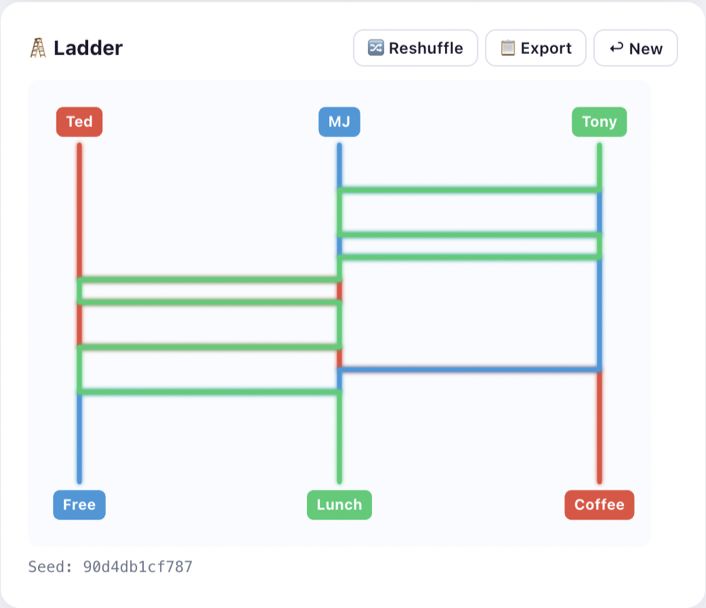
- Canvas-based ladder visualization: Decomposes the Fisher-Yates result into bubble sort adjacent swaps to place rungs, and displays path animations in per-player colors.
Widget UI#
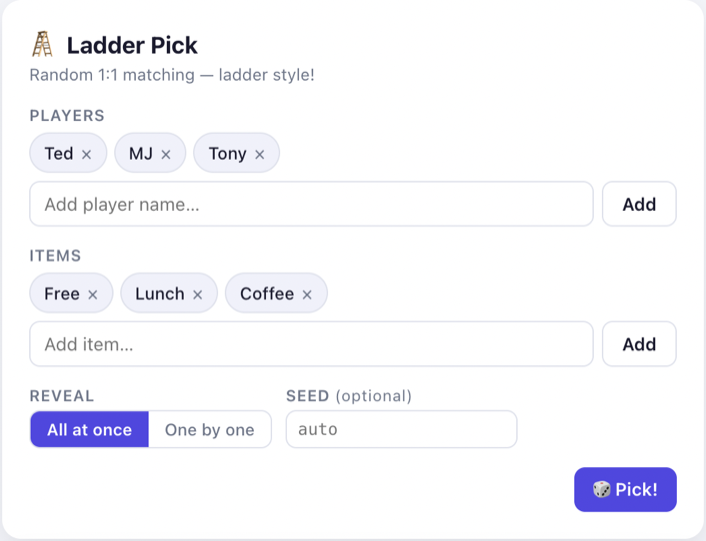
When a user types @Ladder Pick or something like “play a ladder game” in ChatGPT, ChatGPT calls the create_game tool and the Ladder Pick widget is displayed in an iframe.
Local Testing and Deployment#
Local Testing#
During initial implementation testing, I ran the server locally and used ngrok to create an HTTPS URL, then switched ChatGPT to Developer Mode to add and test the app.
AWS Lightsail Deployment#
To register an app on ChatGPT Apps, the MCP server needed to be deployed to an externally accessible server. I decided to deploy using AWS Lightsail. The setup was as follows:
- Lightsail instance ($5 / month) with Nginx reverse proxy + Let’s Encrypt HTTPS configuration
- PM2 for MCP server process management
- Path-based routing structure to allow hosting additional apps on the same instance in the future
App Registration Process: A Surprisingly Time-Consuming Phase#
Clicking the New App button on platform.openai.com/apps-manage and going through the app registration process consumed a significant amount of time. Every requirement was mandatory, and there were many items to prepare one by one.
App Information#
- I entered basic information such as the app name, description, and category.
- A separate Terms of Service page had to be created.
- A demo video also had to be produced, uploaded to S3, and its URL provided.
MCP Server Information#
- I entered the server URL and modified the Nginx configuration to serve the verification value at the required path (
/.well-known/openai-apps-challenge) for domain verification.
Other Requirements#
- I provided descriptions for each tool.
- I documented test cases.
- I created and uploaded screenshots.
- Various additional information was required, including a privacy policy URL and supported country settings.
Demo Video#
Below is a demo video of the Ladder Pick app. It shows the process of creating a ladder game within ChatGPT and viewing the matching results in the widget.
Current Status#
The Ladder Pick app has been submitted to ChatGPT Apps and is currently in the “review” stage. Once it passes OpenAI’s review, it will be published on the App Directory.
Looking Back#
I initially thought, “It’s just a simple ladder game, so it’ll be done in no time,” but in reality, it took far more time than expected. More time was spent preparing all the requirements for the registration process one by one than writing the app code itself. Creating a Terms of Service page, recording and uploading a demo video, setting up domain verification, writing test cases, producing screenshots — each was a small task on its own, but together they added up to a significant amount of time.
Nevertheless, I believe this entire process was an exercise in practicing the “absorb and convert” mindset. Having gone through the full journey — from discovering the ChatGPT Apps platform to actually building an app and submitting it for registration — has laid the groundwork for responding much more quickly when building additional apps on this platform or when other new platforms emerge in the future.